Interactive Guide
Hyper Dev — Harness Framework
A visual map of how the pieces fit together: your IDE agent sits at the centre, powered by an LLM, surrounded by graph retrieval, memory, and MCP tooling — all orchestrated through composable skills.
↑ Click any component in the diagram to jump to its details below
The Problem
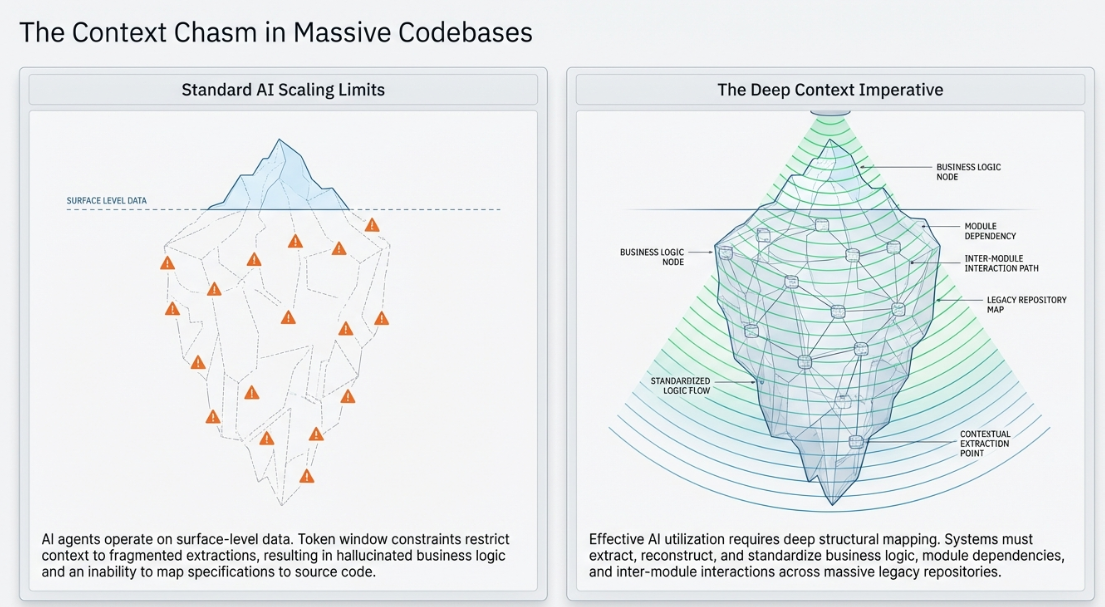
The Context Chasm in Massive Codebases
Standard AI agents operate on surface-level data — token windows fragment context, leading to hallucinated business logic and an inability to map specifications to source code. The deep-context imperative requires structural mapping of business logic, module dependencies, and inter-module interactions across legacy repositories.
The Architecture
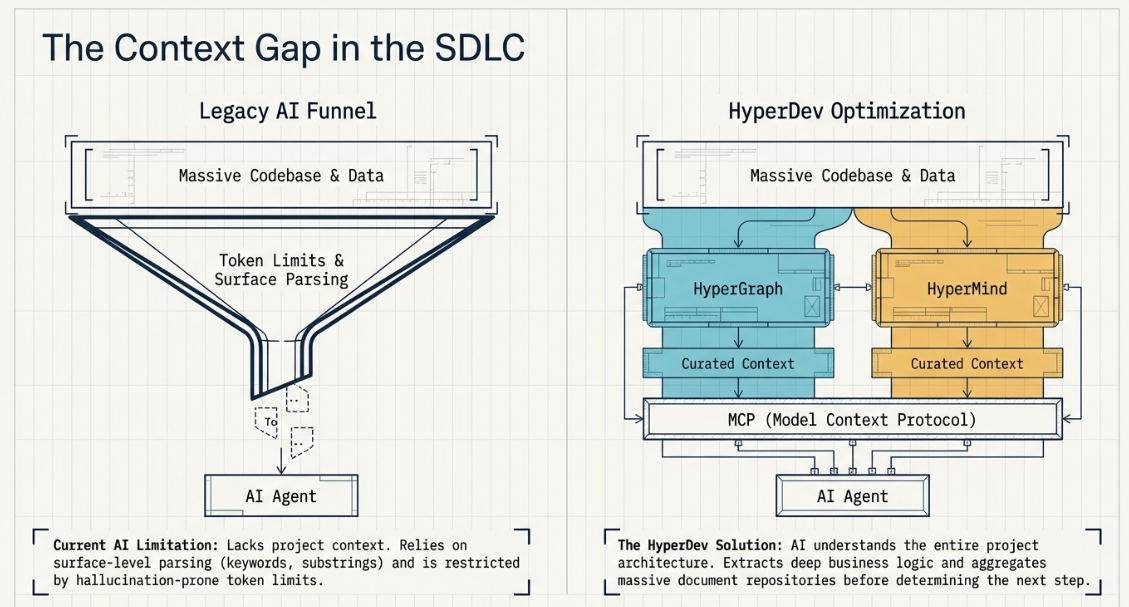
How the Harness Works
Instead of funneling a massive codebase through token limits, HyperDev processes it in parallel — Hyper Graph extracts code structure, Hyper Mind extracts document knowledge — then both feed curated context through the MCP server to the AI Agent.
LLM
Core reasoning engine
The language model at the centre of the harness. It receives context from Hyper Graph and Hyper Mind, follows skills from the workflow layer, and produces code, analysis, or documentation inside the IDE agent.
Setup & Usage
- 01Choose an IDE agent (Claude Code, Cursor, or OpenCode) that connects to your preferred LLM provider.
- 02Ensure the model has a sufficient context window for code-graph retrieval results.
- 03Verify that the MCP server is reachable so graph and memory tools are available to the model.
IDE AGENTS
Claude · Cursor · OpenCode
The coding assistants that consume the harness. Each agent reads project instructions, loads skills from the catalog, and calls MCP tools (graph_mcp, mind_mcp) to ground its answers in your codebase.
Setup & Usage
- 01Claude Code — skills live in .claude/skills/, project rules in CLAUDE.md.
- 02Cursor — rules in .cursorrules, MCP config in settings.
- 03OpenCode — uses AGENTS.md for project-level instructions.
- 04Point each agent at the same MCP server so graph and memory context is shared.
Related
/.claude/skills/.cursorrules/AGENTS.mdWORKFLOW
Skill orchestration layer
The collection of composable skills that structure development work — from planning and implementation to debugging, testing, and security review. Each skill is a markdown-defined workflow that the IDE agent follows.
Setup & Usage
- 01Browse the catalog at the home page to discover available skills.
- 02Skills are invoked by name in the IDE agent (e.g. /hi-plan, /hi-debug, /hi-fix).
- 03Chain skills for full workflows: hi-repo-search → hi-plan → hi-craft → hi-fix → hi-security.
HYPER KIT
Skill catalog & directory
This application — a searchable, source-linked directory of agent skills. It synchronises SKILL.md files from managed GitHub repositories and presents them with topics, search, and audit history.
Setup & Usage
- 01Run npm run dev to start the local development server.
- 02Run npm run sync to fetch the latest skill catalog from upstream repositories.
- 03Use the search bar or / shortcut to find skills by name, topic, or purpose.
Related
HYPER GRAPH
Code graph & semantic index
A FalkorDB-backed code graph combined with Qdrant vector search (semantic index). It indexes your codebase — functions, classes, call paths, dependencies — then exposes semantic_search, explore_graph, and trace_flow through graph_mcp so the IDE agent can navigate code by meaning, not just text.
Setup & Usage
- 01Start FalkorDB: redis://localhost:6379 (graph name: askilldev).
- 02Start Qdrant: localhost:6333 (collection: askilldev).
- 03Run the Cortex Harness ingest to build the code graph and semantic index.
- 04Verify with a graph_mcp.semantic_search probe scoped to your module.
Related
/.cortext-harness/config/dev.json/docs/operations.mdHYPER MIND
Memory & knowledge documents
The memory and knowledge document layer. mind_mcp provides hybrid_search across project documents, architecture notes, plans, and accumulated context — giving the IDE agent persistent awareness of project decisions, conventions, and design rationale that live outside the code itself.
Setup & Usage
- 01Ensure the document graph is ingested (plans/ directory is the doc source).
- 02Use mind_mcp.hybrid_search to retrieve project knowledge and architectural context.
- 03Memory files (*.md) in the workspace feed long-term project context.
Related
/plans/docsHYPER MCP
MCP server interface
The Model Context Protocol server that bridges the IDE agent to Hyper Graph and Hyper Mind. It exposes graph_mcp tools (semantic_search, explore_graph, trace_flow, find_paths) and mind_mcp tools (hybrid_search) so the LLM can query your codebase and documents directly.
Setup & Usage
- 01Configure the MCP server endpoint in your IDE agent settings.
- 02Verify graph_mcp and mind_mcp tools are discoverable by the agent.
- 03Use hi-cortex skill to manage the MCP server lifecycle and config updates.
Under the Hood
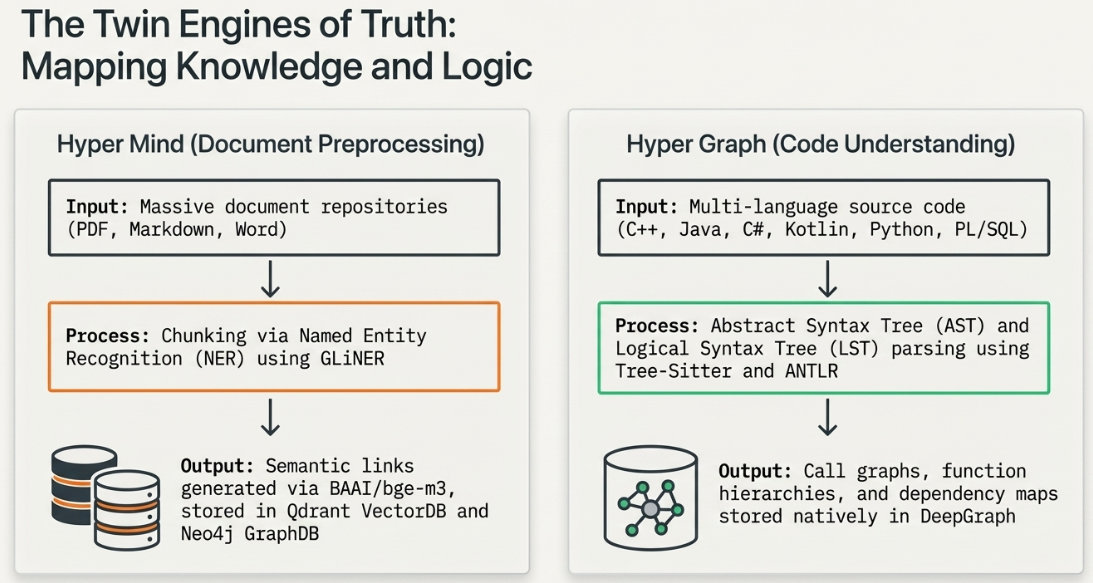
Architecture Deep Dive — The Twin Engines
Hyper Mind ingests massive document repositories and uses NER (GLiNER) with semantic embeddings (BAAI/bge-m3) to build searchable knowledge in Qdrant and Falkordb/Neo4j. Hyper Graph parses multi-language source code into AST/LST structures via Tree-Sitter and ANTLR, producing call graphs and dependency maps stored natively in DeepGraph.